
- What is the Salary Calculator?
- Why Should You Use a California Salary Calculator?
- How It Works?
- Try Our Salary Calculator AI
- Why It Matters for Budgeting
- FAQs
- Conclusion
How to Use the California Salary Calculator for Net Pay?

If you’re living and working in California, understanding how much of your salary will end up in your bank account after taxes and deductions is essential. A California salary calculator can help you determine your take-home pay, providing you with a clear picture of your financial situation. In this blog, we’ll explain how the California salary calculator works, why it’s important, and how you can use it to get accurate results.

What is the Salary Calculator?
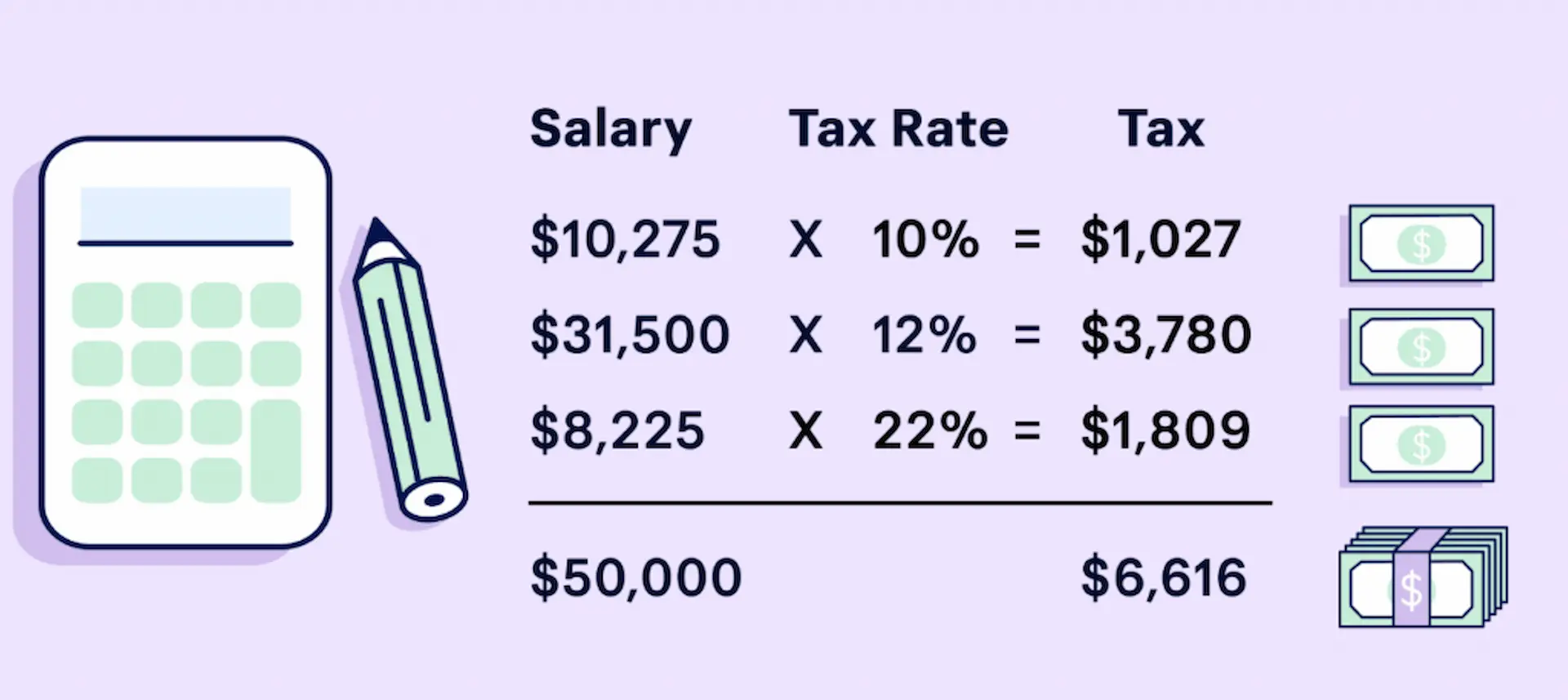
The California salary calculator is a tool designed to help you estimate your net salary by accounting for various deductions like federal income tax, California state income tax, Social Security, Medicare, and other factors that impact your earnings. Since California has its own set of tax rates and rules, it’s essential to use a tool that specifically accounts for these factors. The calculator helps you understand how much of your gross income will be deducted, leaving you with a more accurate estimate of your take-home pay.
Why Should You Use a California Salary Calculator?
Understanding your take-home pay is crucial for managing your finances. In California, where taxes can vary based on income level and filing status, the California salary calculator provides a quick and reliable estimate of how much you will actually take home. Using the calculator can help you:
- Plan your budget: Knowing your net salary helps you make smarter financial decisions and plan your expenses more effectively.
- Make informed financial choices: Whether you’re saving for the future or adjusting your withholding, understanding your after-tax income is key.
- Negotiate your salary: If you’re comparing job offers or evaluating salary changes, the calculator helps you understand the actual amount you’ll receive after taxes.
Calculating your take-home pay can be a complex and time-consuming process, especially in California, where taxes can vary significantly based on your income, filing status, and deductions. Without the right tools, you may struggle to account for federal and state taxes, Social Security, Medicare, 401(k) contributions, and health insurance premiums. Even a small mistake can result in over- or under-estimating your take-home pay, which can affect your budgeting and financial planning.
Using a California salary calculator removes the guesswork and helps you avoid the hassle of manually calculating each deduction. It simplifies the process, giving you an accurate estimate of your net income in just a few clicks. With this tool, you can confidently plan your finances without worrying about tax mistakes or missed deductions.
How It Works?
To use the California salary calculator, you simply need to input your gross salary (your income before taxes) and other relevant details. The calculator will then apply federal, state, and local tax rates, along with other deductions like Social Security and Medicare, to provide an estimate of your net pay.
Here’s a breakdown of the steps involved:
- Input your gross salary: This is the total amount you earn before any deductions are made.
- Choose your filing status: Whether you’re single, married, or filing jointly, your tax bracket will differ based on your status.
- Include deductions: If you have additional deductions (like retirement contributions, health insurance premiums, etc.), you can input them into the calculator for a more accurate estimate.
- Get your results: The calculator will give you an estimate of your take-home pay after all taxes and deductions have been subtracted.
By entering these details, the California salary calculator will give you a more accurate picture of what you will actually bring home after all necessary deductions are taken into account.
Try Our Salary Calculator AI
Our Salary Calculator AI helps you estimate your take-home pay by factoring in federal and state taxes, 401(k) contributions, and health insurance premiums.
For example, with a $100,000 salary, 10% 401(k), and $300 health insurance, you'll take home $61,881.30 annually or $5,157 monthly. Simply enter your details to get an instant breakdown of your net salary.
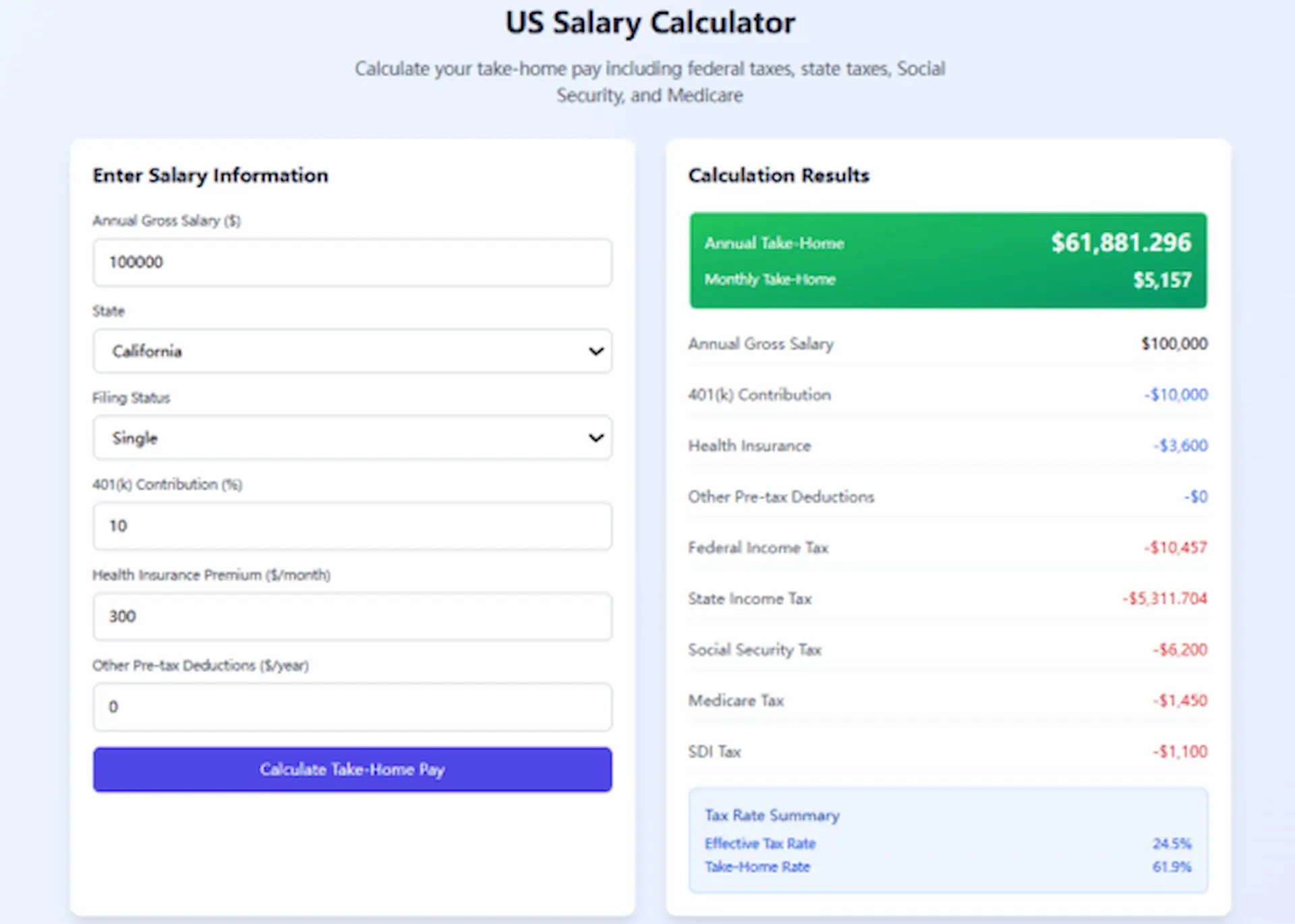
Use our tool today to understand your true earnings and plan your finances more effectively.
Why It Matters for Budgeting
For many people, understanding their take-home pay is essential for managing their finances. If you’re in California, the tax rates and deductions can be complex, and the California salary calculator is a helpful tool to navigate this. It ensures that you have an accurate understanding of your finances, which is crucial for budgeting, saving, and planning for future expenses.
Without using the calculator, you might only know your gross salary and miss out on important deductions that impact your actual earnings. This could lead to financial surprises at the end of the year. By using a California salary calculator, you can take control of your financial situation and ensure that your paycheck meets your expectations.
In addition to that, the Annual Budget Flow feature in Salary Calculator AI offers a visual breakdown of your budget, showing how your income flows into various categories like taxes, housing, food, transportation, and savings. This helps you to understand exactly where your money is going, and make informed decisions to allocate resources more effectively. You can easily adjust the amounts for each category to better plan your spending and savings goals.
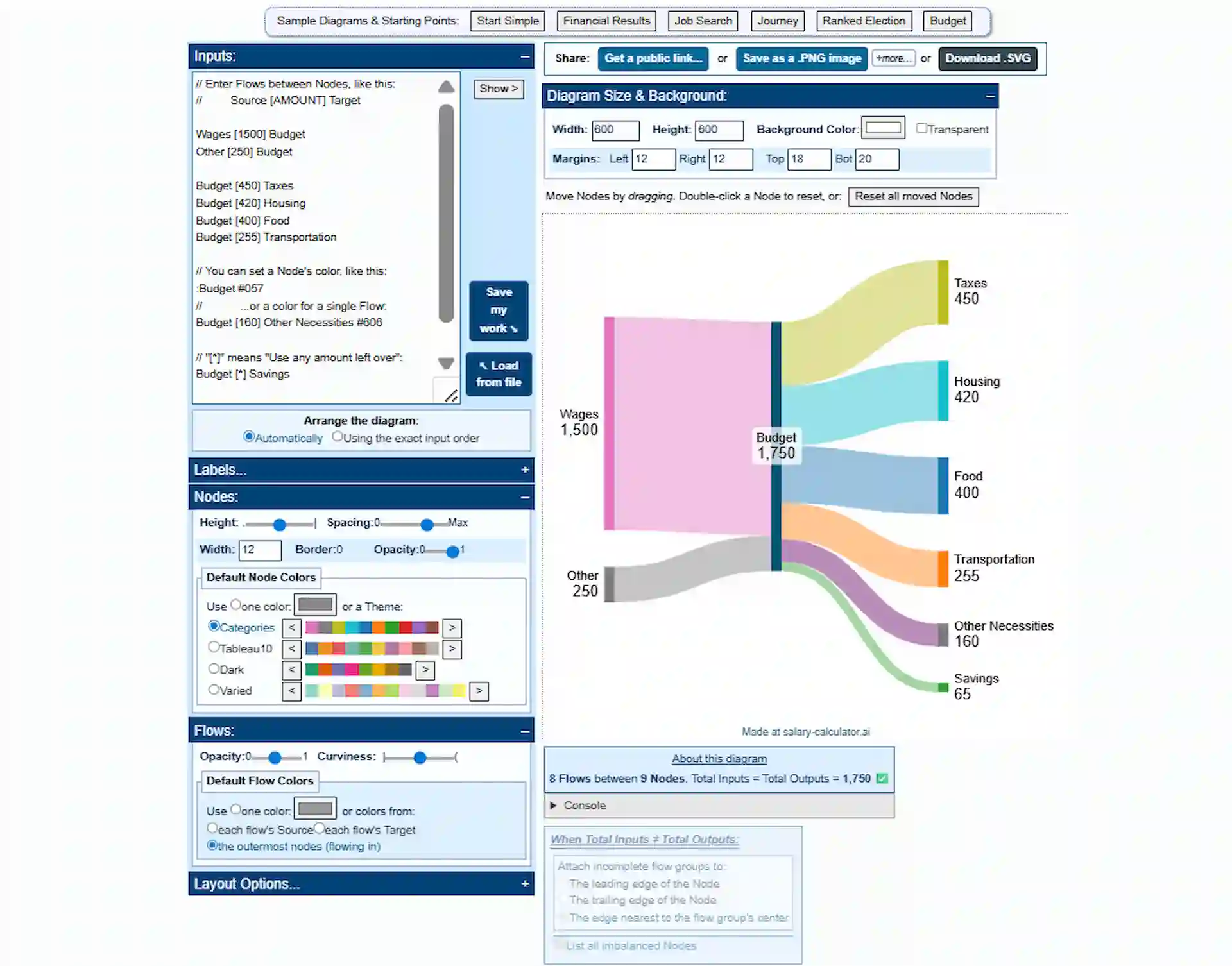
This tool is invaluable for ensuring that your financial planning is aligned with your actual earnings and expenses, reducing the risk of financial surprises and helping you stay on top of your finances.
FAQs
How can I convert my annual salary to an hourly wage in California?
To convert your annual salary to an hourly wage, simply divide your salary by the number of hours you work per year. Typically, a full-time work year consists of 2,080 hours (40 hours per week for 52 weeks). For example, if you make $60,000 annually, you would divide $60,000 by 2,080, which equals approximately $28.85 per hour.
For more accurate calculations, try our Salary Calculator AI, which offers a precise hourly wage conversion tool, tailored specifically for California's salary laws and tax structure. It’s designed to simplify the process and provide you with the most up-to-date information.
What is the average salary in California?
California's average salary varies significantly based on industry, job function, and location within the state. However, according to recent data, the average annual salary in California is around $60,000.
How do I calculate my take-home pay in California after taxes?
Your take-home pay in California depends on several factors, including your salary, filing status, and the various deductions for state and federal taxes. The California Salary Calculator can help you estimate your take-home pay by considering these factors.
What payroll tax rate applies to employers in California?
Employers in California must pay payroll taxes, including state unemployment insurance (UI), employment training tax (ETT), and state disability insurance (SDI). These taxes vary, so it's essential for employers to use a reliable payroll tax calculator to ensure accurate deductions.
How do bonuses affect my salary in California?
Bonuses are typically subject to both federal and state income tax in California. If you receive a bonus, it will be taxed as regular income, and you may want to use a California bonus calculator to estimate the tax impact.
Conclusion
A California salary calculator is an invaluable tool for anyone working in California. It helps you understand your true earnings by accounting for all the necessary deductions. Whether you're planning your budget, negotiating a new salary, or adjusting your tax withholdings, this calculator will provide you with the insights you need to manage your finances more effectively. Try our Salary Calculator AI today and get accurate results in just a few clicks!